How to buy HyperPublish
Please skip this section if you’ve already bought and registered HyperPublish!
Just go to the
Web site (
click here: we accept any credit card, US check, UK cheque, Eurocheque, Postcheque, International Money Order, Bank wire, PayPal, cash - fax, phone and purchase orders available).
Click here to get the electronic edition on-line (we accept any credit card, US check, UK cheque, Eurocheque, Postcheque, International Money Order, Bank wire, PayPal, cash - fax, phone and purchase orders available). If you are an individual, you need the single license. If you buy for a school or a firm, you have to take the site license (called “classroom” license for schools).
When paid, you’ll receive the private address where to download the “registrable” edition. Please note that it is not needed to uninstall the trial.
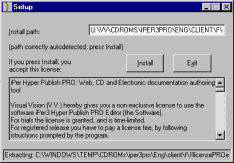
When the download is done, open the folder that contains the file, and double click over the file icon.
Press Install. You will see the registration Wizard. Follow the instructions, and then wait for the registration email.
Do you have precise and constructive suggestions on how to improve this page with more clear instructions / detail?
Contact us!
Some other VisualVision professional software programs: