Live browsing and editing with WYSIWYLTM
HyperPublish takes full advantage of its hypertext orientated architecture in many productive ways. For example, the innovative WYSIWYL™ (What You See Is What You Link) dramatically increases speed in link browsing and management.
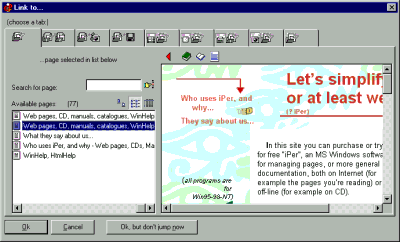
WYSIWYL™ means that you can browse links while in the editor, without the need to switch to preview mode (just double click the link!), and you can insert links through visual previews (just select a text then use Insert >Link or Insert >Special Link; right mouse button for images; You see the destination page in a preview dialog, and you can actually navigate in this preview: no need to remember page names!!).
You can place elaborate frame-to-frame links, show or close pop-up windows, and all through simple visual dialogs, without scripts or other complications. You can even check links with the link explorer (internal links are automatically checked).
There are two main kinds of link. The first are normal links (Insert >Link), and then special links as detailed below. It is simply not practical to display all available options, as you will see below:
You can link to internal pages, internet addresses (such http://...), other site / hypertext / catalog, and more. You can even create new pages while linking. You can choose destination even by browsing the preview!
With special links Hyper Publish offers almost limitless links, to a different frame, a different browser window, to a popup, even with or without an “anchor” (i.e. a fixed point in the page). As above, available options are too numerous to list here.
The special link insertion window. You can link to frames, windows, internal pages, internet addresses (such http://...), other hypertext, and more.
Do you have precise and constructive suggestions on how to improve this page with more clear instructions / detail?
Contact us!
Some other VisualVision professional software programs: